
Instructions
-
Selection: Go to the Astah Online Store and add your desired product to the cart.
-
User Information: Enter your required contact and billing information, then click [Next].
-
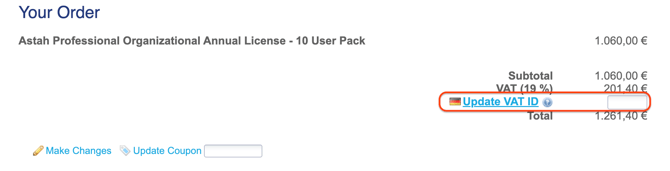
VAT Entry: * Locate the VAT field that appears on the confirmation page.
-
Enter your valid VAT number.
-
Click [Update VAT ID] to validate the ID and adjust the tax calculation.
-
-
Finalize: Finish your purchase.
* Note: The VAT ID field only appears after the initial information step is completed.