
The AI Code Reverse feature was introduced in Astah Professional and UML version 11.0. If the AI Code Reverse option is missing from your menu, it is typically due to an outdated version or a plugin initialization error.
1. Verify Version & Menu Location
Ensure you are running version 11.0 or higher. The feature is located at: [Tools] → [AI Code Reverse...]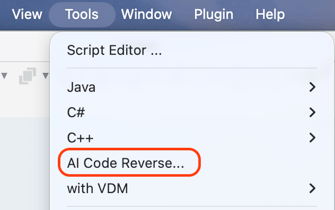
2. Check Plugin Status
Confirm that the plugin is correctly loaded within the application:
-
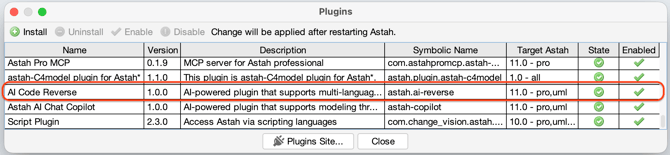
Navigate to [Plugin] → [Installed Plugins…].
-
Look for AI Code Reverse in the list of active plugins.
3. Reinstallation
If the AI Code Reverse plugin is missing from the list, download the latest plugin to ensure all components are properly registered.
4. Technical Support & Log Files
If the feature remains unavailable after reinstallation, please provide your log file to the support team for diagnosis.
C:\Users\<UserName>\.astah\professional\astah_pro.log C:\Users\<UserName>\.astah\professional\astah_uml.log