
To access Astah license management, downloads, and technical support, you must first register for a Change Vision (CV) Members account. This guide provides the necessary steps to complete your registration.
Step-by-Step Registration
-
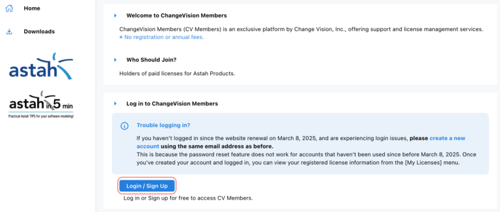
Navigate to the CV Members site and click the [Login / Sign Up] button.
-
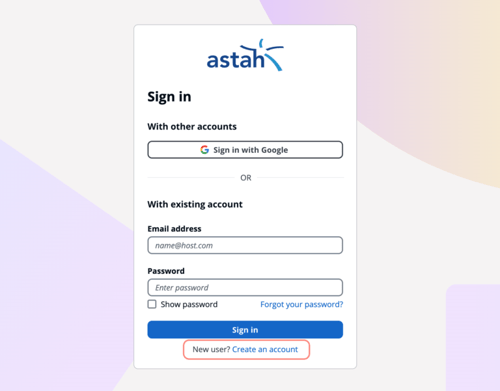
When the Sign-in screen opens, click [Create an account] to proceed.
-
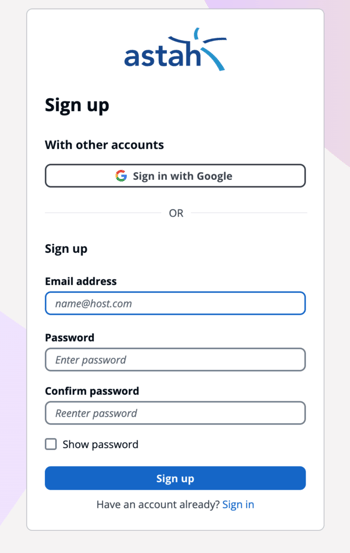
The Sign-up screen provides two options:
-
Sign up with Google: Use your existing Google credentials for a faster setup.
-
Email & Password: Enter your email address and create a unique password, then click the [Sign Up] button.
-
-
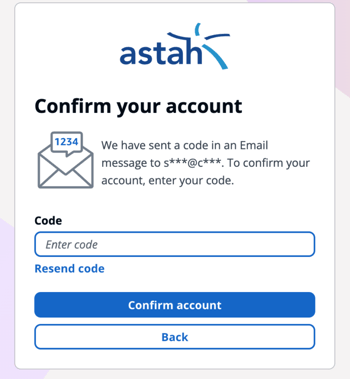
A Verification Code will be sent to your registered email address. Enter the code in the provided field and click [Confirm account].
-
Profile Registration
-
User Agreement: Read the agreement carefully and click [Next] to continue.
-
Required Information: Enter your details in the mandatory fields and click the [Register] button to complete the process.
-