---
title: How to Request Technical Support for Astah Products
description: Need technical assistance? Learn how to submit a support request directly from within the Astah application or through your ChangeVision Members account.
---
[Skip to content](https://lp.astah.net/en/knowledge-base/how-to-receive-technical-support#main-content)
English
Show submenu for translations
[](https://lp.astah.net/en/knowledge-base?hsLang=en)
Open main navigation
Close main navigation
- English
Show submenu for translations
- [Astah Website](https://astah.net/)
[Astah Website](https://astah.net/)
How can we help you?
- There are no suggestions because the search field is empty.
1. [Astah Help Center](https://lp.astah.net/en/knowledge-base?hsLang=en)
2. [Getting Technical Support for Astah](https://lp.astah.net/en/knowledge-base/getting-technical-support-for-astah?hsLang=en)
3. [Support Services](https://lp.astah.net/en/knowledge-base/getting-technical-support-for-astah?hsLang=en#support-services)
# How to Request Technical Support for Astah Products
## A guide on accessing the official support request form via the software or the ChangeVision portal.
Technical support is available to users with an active support license. Our support team assists with technical queries and issues submitted through our official request form.
### **Method 1: Access via Astah Application**
The most direct way to contact support is through the application's built-in menu.
- **Windows & macOS:**
1. Open your Astah application.
2. Go to the top menu and select **\[Help\]**.
3. Click **\[Astah Support\]**.
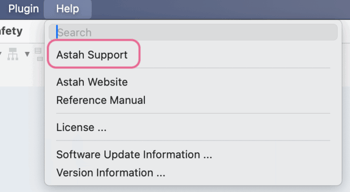
4. Your browser will open the support request form.
### **Method 2: Access via Web Browser**
If you cannot launch the software, you can access the form through your member portal.
1. Open your browser and navigate to [the **ChangeVision Members** site](https://members.change-vision.com/en).
2. Log in with your account credentials.
3. Select **\[Support\]** from the side or top menu to launch the form.
---
> **Requirement:** Please note that a **valid support license** is required to receive technical assistance. You can verify your support status within the \[My Licenses\] section of the ChangeVision Members site.
- [Astah License FAQ: Activation & Renewal](https://lp.astah.net/en/knowledge-base/astah-license-faq-activation-renewal?hsLang=en#main-content)
- [License Management](https://lp.astah.net/en/knowledge-base/astah-license-faq-activation-renewal?hsLang=en#license-management)
- [License Renewal](https://lp.astah.net/en/knowledge-base/astah-license-faq-activation-renewal?hsLang=en#license-renewal)
- [License Renewal - Perpetual](https://lp.astah.net/en/knowledge-base/astah-license-faq-activation-renewal?hsLang=en#license-renewal-perpetual)
- [Academic](https://lp.astah.net/en/knowledge-base/astah-license-faq-activation-renewal?hsLang=en#academic)
- [Product Evaluation](https://lp.astah.net/en/knowledge-base/astah-license-faq-activation-renewal?hsLang=en#product-evaluation)
- [Usage Rights](https://lp.astah.net/en/knowledge-base/astah-license-faq-activation-renewal?hsLang=en#usage-rights)
- [Free Student License](https://lp.astah.net/en/knowledge-base/astah-license-faq-activation-renewal?hsLang=en#free-student-license)
- [License Delivery](https://lp.astah.net/en/knowledge-base/astah-license-faq-activation-renewal?hsLang=en#license-delivery)
- [License Activation](https://lp.astah.net/en/knowledge-base/astah-license-faq-activation-renewal?hsLang=en#license-activation)
- [ChangeVision Members Account FAQ](https://lp.astah.net/en/knowledge-base/changevision-members-account-faq?hsLang=en#main-content)
- [Account Management](https://lp.astah.net/en/knowledge-base/changevision-members-account-faq?hsLang=en#account-management)
- [Access & Authentication](https://lp.astah.net/en/knowledge-base/changevision-members-account-faq?hsLang=en#access-authentication)
- [Buying Astah: Orders, VAT & Discounts](https://lp.astah.net/en/knowledge-base/buying-astah-orders-vat-discounts?hsLang=en#main-content)
- [Post-Purchase Support](https://lp.astah.net/en/knowledge-base/buying-astah-orders-vat-discounts?hsLang=en#post-purchase-support)
- [Purchasing & Payments](https://lp.astah.net/en/knowledge-base/buying-astah-orders-vat-discounts?hsLang=en#purchasing-payments)
- [Subscription Management](https://lp.astah.net/en/knowledge-base/buying-astah-orders-vat-discounts?hsLang=en#subscription-management)
- [Tax & Invoicing](https://lp.astah.net/en/knowledge-base/buying-astah-orders-vat-discounts?hsLang=en#tax-invoicing)
- [Pricing & Discounts](https://lp.astah.net/en/knowledge-base/buying-astah-orders-vat-discounts?hsLang=en#pricing-discounts)
- [Astah Installation & Setup FAQ](https://lp.astah.net/en/knowledge-base/astah-installation-setup-faq?hsLang=en#main-content)
- [Download & Installation](https://lp.astah.net/en/knowledge-base/astah-installation-setup-faq?hsLang=en#download-installation)
- [Environment Settings](https://lp.astah.net/en/knowledge-base/astah-installation-setup-faq?hsLang=en#environment-settings)
- [License Activation](https://lp.astah.net/en/knowledge-base/astah-installation-setup-faq?hsLang=en#license-activation)
- [AI Configuration](https://lp.astah.net/en/knowledge-base/astah-installation-setup-faq?hsLang=en#ai-configuration)
- [AI Chat Copilot / MCP Server](https://lp.astah.net/en/knowledge-base/astah-installation-setup-faq?hsLang=en#ai-chat-copilot-mcp-server)
- [Integrations & Plugins](https://lp.astah.net/en/knowledge-base/astah-installation-setup-faq?hsLang=en#integrations-plugins)
- [Astah Feature Guides & Modeling Tips](https://lp.astah.net/en/knowledge-base/astah-feature-guides-modeling-tips?hsLang=en#main-content)
- [Export / Printing](https://lp.astah.net/en/knowledge-base/astah-feature-guides-modeling-tips?hsLang=en#export-printing)
- [Diagram Editing in Astah: How-To FAQ](https://lp.astah.net/en/knowledge-base/diagram-editing-in-astah-how-to-faq?hsLang=en#main-content)
- [Activity Diagrams / Statemachine Diagrams](https://lp.astah.net/en/knowledge-base/diagram-editing-in-astah-how-to-faq?hsLang=en#activity-diagrams-statemachine-diagrams)
- [Using the Astah Interface: FAQ](https://lp.astah.net/en/knowledge-base/using-the-astah-interface-faq?hsLang=en#main-content)
- [Basics / General Operations](https://lp.astah.net/en/knowledge-base/using-the-astah-interface-faq?hsLang=en#basics-general-operations)
- [Astah Product Specs & Compatibility](https://lp.astah.net/en/knowledge-base/astah-product-specs-compatibility?hsLang=en#main-content)
- [Compatibility & Interoperability](https://lp.astah.net/en/knowledge-base/astah-product-specs-compatibility?hsLang=en#compatibility-interoperability)
- [Getting Technical Support for Astah](https://lp.astah.net/en/knowledge-base/getting-technical-support-for-astah?hsLang=en#main-content)
- [Support Services](https://lp.astah.net/en/knowledge-base/getting-technical-support-for-astah?hsLang=en#support-services)
- [File Handling & Security](https://lp.astah.net/en/knowledge-base/getting-technical-support-for-astah?hsLang=en#file-handling-security)
- [Troubleshooting Common Astah Issues](https://lp.astah.net/en/knowledge-base/troubleshooting-common-astah-issues?hsLang=en#main-content)
- [Feature Access / Plugins](https://lp.astah.net/en/knowledge-base/troubleshooting-common-astah-issues?hsLang=en#feature-access-plugins)
- [Diagram Editor](https://lp.astah.net/en/knowledge-base/troubleshooting-common-astah-issues?hsLang=en#diagram-editor)
- [Astah Software Updates & Upgrades](https://lp.astah.net/en/knowledge-base/astah-software-updates-upgrades?hsLang=en)
- [Reporting a Bug in Astah](https://lp.astah.net/en/knowledge-base/reporting-a-bug-in-astah?hsLang=en#main-content)
- [Diagnostic Data](https://lp.astah.net/en/knowledge-base/reporting-a-bug-in-astah?hsLang=en#diagnostic-data)
- [Submission Guidelines](https://lp.astah.net/en/knowledge-base/reporting-a-bug-in-astah?hsLang=en#submission-guidelines)
- [AI Chat Copilot / Diagnostic Data](https://lp.astah.net/en/knowledge-base/reporting-a-bug-in-astah?hsLang=en#ai-chat-copilot-diagnostic-data)
[](https://astah.net/)
Provided by Change Vision, Inc.
Copyright © 2026, Change Vision, Inc.