---
title: This is my first time to login after CV Members renewal. How do I login?
description: Guide for users logging into the renewed Change Vision Members site for the first time using existing credentials or Google SSO.
---
[Skip to content](https://lp.astah.net/en/knowledge-base/login-after-renewal#main-content)
English
Show submenu for translations
[](https://lp.astah.net/en/knowledge-base?hsLang=en)
Open main navigation
Close main navigation
- English
Show submenu for translations
- [Astah Website](https://astah.net/)
[Astah Website](https://astah.net/)
How can we help you?
- There are no suggestions because the search field is empty.
1. [Astah Help Center](https://lp.astah.net/en/knowledge-base?hsLang=en)
2. [ChangeVision Members Account FAQ](https://lp.astah.net/en/knowledge-base/changevision-members-account-faq?hsLang=en)
3. [Access & Authentication](https://lp.astah.net/en/knowledge-base/changevision-members-account-faq?hsLang=en#access-authentication)
# This is my first time to login after CV Members renewal. How do I login?
## Instructions for existing users migrating to the renewed CV Members portal
[The Change Vision (CV) Members site](https://members.change-vision.com/en) has been renewed to provide a better user experience. If you had an account on the previous version of the site, your credentials have been migrated. You can access the new portal using the steps below.
### How to Access Your Existing Account
1. Go to the [CV Members site](https://members.change-vision.com/en) and click the **\[Login / Sign Up\]** button.
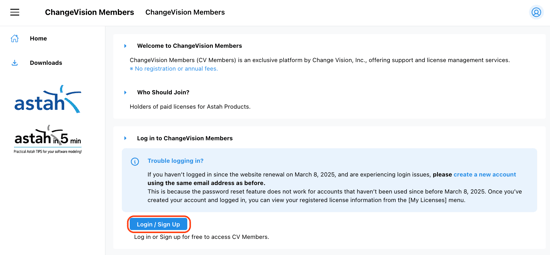
2. You have two ways to access your migrated account:
- **Same Credentials:** Enter the **email address and password** you used on the previous site, then click **\[Sign in\]**.
- **Sign in with Google:** If your registered email address matches your Google account email, you can click the **\[Sign in with Google\]** button for a seamless login.
- [Astah License FAQ: Activation & Renewal](https://lp.astah.net/en/knowledge-base/astah-license-faq-activation-renewal?hsLang=en#main-content)
- [License Management](https://lp.astah.net/en/knowledge-base/astah-license-faq-activation-renewal?hsLang=en#license-management)
- [License Renewal](https://lp.astah.net/en/knowledge-base/astah-license-faq-activation-renewal?hsLang=en#license-renewal)
- [License Renewal - Perpetual](https://lp.astah.net/en/knowledge-base/astah-license-faq-activation-renewal?hsLang=en#license-renewal-perpetual)
- [Academic](https://lp.astah.net/en/knowledge-base/astah-license-faq-activation-renewal?hsLang=en#academic)
- [Product Evaluation](https://lp.astah.net/en/knowledge-base/astah-license-faq-activation-renewal?hsLang=en#product-evaluation)
- [Usage Rights](https://lp.astah.net/en/knowledge-base/astah-license-faq-activation-renewal?hsLang=en#usage-rights)
- [Free Student License](https://lp.astah.net/en/knowledge-base/astah-license-faq-activation-renewal?hsLang=en#free-student-license)
- [License Delivery](https://lp.astah.net/en/knowledge-base/astah-license-faq-activation-renewal?hsLang=en#license-delivery)
- [License Activation](https://lp.astah.net/en/knowledge-base/astah-license-faq-activation-renewal?hsLang=en#license-activation)
- [ChangeVision Members Account FAQ](https://lp.astah.net/en/knowledge-base/changevision-members-account-faq?hsLang=en#main-content)
- [Account Management](https://lp.astah.net/en/knowledge-base/changevision-members-account-faq?hsLang=en#account-management)
- [Access & Authentication](https://lp.astah.net/en/knowledge-base/changevision-members-account-faq?hsLang=en#access-authentication)
- [Buying Astah: Orders, VAT & Discounts](https://lp.astah.net/en/knowledge-base/buying-astah-orders-vat-discounts?hsLang=en#main-content)
- [Post-Purchase Support](https://lp.astah.net/en/knowledge-base/buying-astah-orders-vat-discounts?hsLang=en#post-purchase-support)
- [Purchasing & Payments](https://lp.astah.net/en/knowledge-base/buying-astah-orders-vat-discounts?hsLang=en#purchasing-payments)
- [Subscription Management](https://lp.astah.net/en/knowledge-base/buying-astah-orders-vat-discounts?hsLang=en#subscription-management)
- [Tax & Invoicing](https://lp.astah.net/en/knowledge-base/buying-astah-orders-vat-discounts?hsLang=en#tax-invoicing)
- [Pricing & Discounts](https://lp.astah.net/en/knowledge-base/buying-astah-orders-vat-discounts?hsLang=en#pricing-discounts)
- [Astah Installation & Setup FAQ](https://lp.astah.net/en/knowledge-base/astah-installation-setup-faq?hsLang=en#main-content)
- [Download & Installation](https://lp.astah.net/en/knowledge-base/astah-installation-setup-faq?hsLang=en#download-installation)
- [Environment Settings](https://lp.astah.net/en/knowledge-base/astah-installation-setup-faq?hsLang=en#environment-settings)
- [License Activation](https://lp.astah.net/en/knowledge-base/astah-installation-setup-faq?hsLang=en#license-activation)
- [AI Configuration](https://lp.astah.net/en/knowledge-base/astah-installation-setup-faq?hsLang=en#ai-configuration)
- [AI Chat Copilot / MCP Server](https://lp.astah.net/en/knowledge-base/astah-installation-setup-faq?hsLang=en#ai-chat-copilot-mcp-server)
- [Integrations & Plugins](https://lp.astah.net/en/knowledge-base/astah-installation-setup-faq?hsLang=en#integrations-plugins)
- [Astah Feature Guides & Modeling Tips](https://lp.astah.net/en/knowledge-base/astah-feature-guides-modeling-tips?hsLang=en#main-content)
- [Export / Printing](https://lp.astah.net/en/knowledge-base/astah-feature-guides-modeling-tips?hsLang=en#export-printing)
- [Diagram Editing in Astah: How-To FAQ](https://lp.astah.net/en/knowledge-base/diagram-editing-in-astah-how-to-faq?hsLang=en#main-content)
- [Activity Diagrams / Statemachine Diagrams](https://lp.astah.net/en/knowledge-base/diagram-editing-in-astah-how-to-faq?hsLang=en#activity-diagrams-statemachine-diagrams)
- [Using the Astah Interface: FAQ](https://lp.astah.net/en/knowledge-base/using-the-astah-interface-faq?hsLang=en#main-content)
- [Basics / General Operations](https://lp.astah.net/en/knowledge-base/using-the-astah-interface-faq?hsLang=en#basics-general-operations)
- [Astah Product Specs & Compatibility](https://lp.astah.net/en/knowledge-base/astah-product-specs-compatibility?hsLang=en#main-content)
- [Compatibility & Interoperability](https://lp.astah.net/en/knowledge-base/astah-product-specs-compatibility?hsLang=en#compatibility-interoperability)
- [Getting Technical Support for Astah](https://lp.astah.net/en/knowledge-base/getting-technical-support-for-astah?hsLang=en#main-content)
- [Support Services](https://lp.astah.net/en/knowledge-base/getting-technical-support-for-astah?hsLang=en#support-services)
- [File Handling & Security](https://lp.astah.net/en/knowledge-base/getting-technical-support-for-astah?hsLang=en#file-handling-security)
- [Troubleshooting Common Astah Issues](https://lp.astah.net/en/knowledge-base/troubleshooting-common-astah-issues?hsLang=en#main-content)
- [Feature Access / Plugins](https://lp.astah.net/en/knowledge-base/troubleshooting-common-astah-issues?hsLang=en#feature-access-plugins)
- [Diagram Editor](https://lp.astah.net/en/knowledge-base/troubleshooting-common-astah-issues?hsLang=en#diagram-editor)
- [Astah Software Updates & Upgrades](https://lp.astah.net/en/knowledge-base/astah-software-updates-upgrades?hsLang=en)
- [Reporting a Bug in Astah](https://lp.astah.net/en/knowledge-base/reporting-a-bug-in-astah?hsLang=en#main-content)
- [Diagnostic Data](https://lp.astah.net/en/knowledge-base/reporting-a-bug-in-astah?hsLang=en#diagnostic-data)
- [Submission Guidelines](https://lp.astah.net/en/knowledge-base/reporting-a-bug-in-astah?hsLang=en#submission-guidelines)
- [AI Chat Copilot / Diagnostic Data](https://lp.astah.net/en/knowledge-base/reporting-a-bug-in-astah?hsLang=en#ai-chat-copilot-diagnostic-data)
[](https://astah.net/)
Provided by Change Vision, Inc.
Copyright © 2026, Change Vision, Inc.